Zsh prompt theme · a JoeInz project
InZsh: a prompt that knows the hour.
A zsh prompt that stays calm, bends to how you like it, and knows when the next prayer falls. Your machine does the maths.
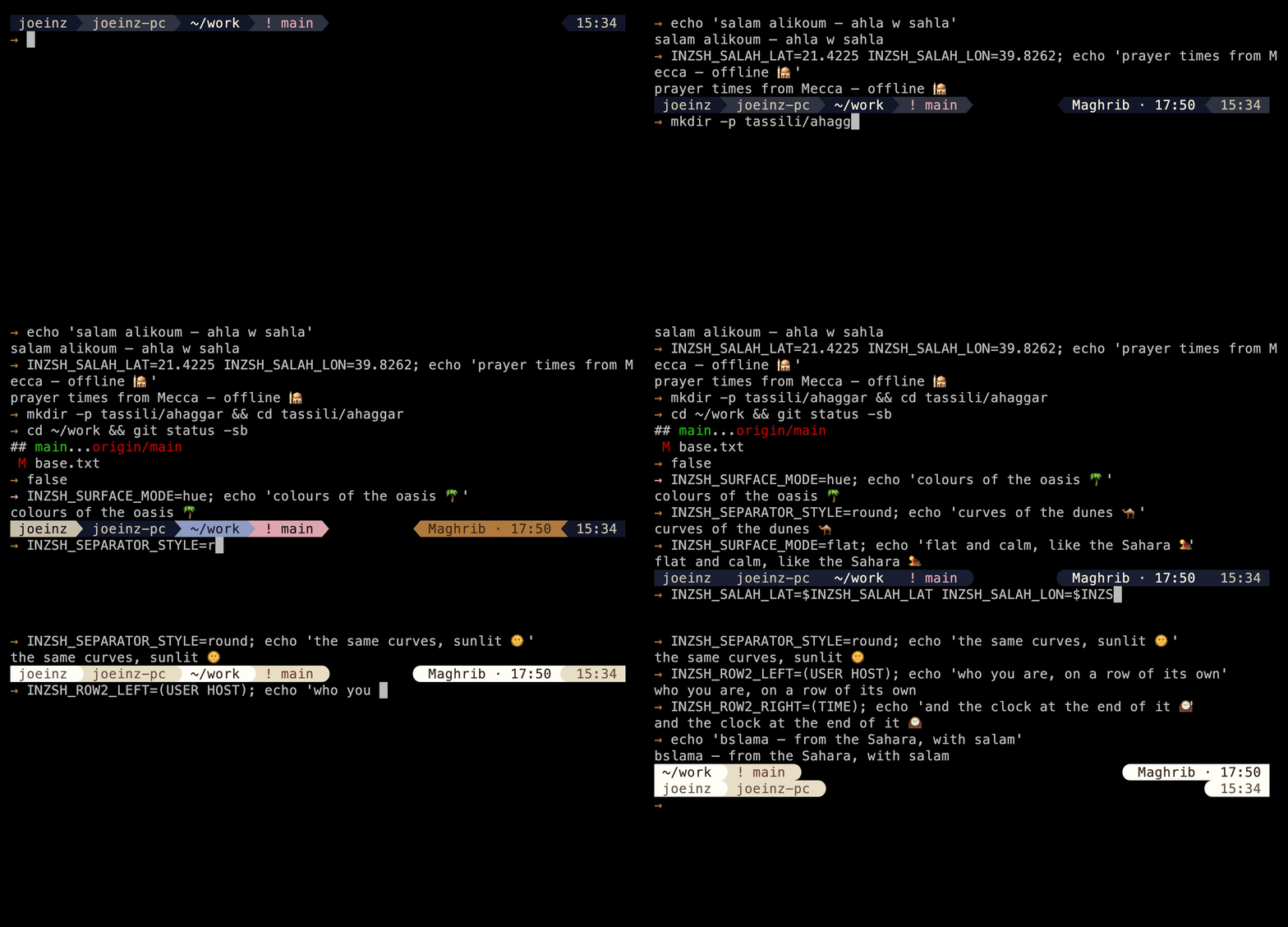
At a glance
-
zsh 5.8+
Minimum version · what CI runs against
-
2 presets
sharp(dark, the default) ·warm(light) -
No network
No calls by default · autolocate is opt-in
-
Zero
Dependencies beyond zsh itself
Why it exists
Three things I wanted from a prompt.
I wanted prayer times in my prompt. Not fetched from a web service, just worked out on my own machine from coordinates I set once. That’s where this started.
Two other things came with it. Every colour in the prompt has a defined job and a contrast ratio that was measured rather than eyeballed, so it holds up on screens I’ve never seen. And every setting declares the values it accepts and what it falls back to, so a typo quietly degrades the prompt instead of breaking it.
That last part is the one I care about most. The knobs are the architecture rather than a layer on top, so whatever comes next should arrive as new settings rather than a rewrite.
Segments · left, right, hidden
What the prompt draws, and in what order.
One integer places a segment along a row and decides whether it is drawn at all. A positive rank puts it on the left, ascending from the left edge; a negative rank puts it on the right, running inward from the right edge; and the numbers need not be contiguous, so 1, 4 and 10 order exactly as they read. A rank of 0 ships the segment hidden — the four rows reading hidden below are the ones sitting at 0 — and it appears the moment you give it another number. WHICH row is a separate question, and a newer one: INZSH_ROW<N>_LEFT and INZSH_ROW<N>_RIGHT answer it, and naming a segment in one of those arrays overrides its rank outright, a 0 included. That is the other way the four hidden segments below are switched on, and it is what the next band is about. Each segment also takes its own overrides — INZSH_<SEGMENT>_RANK, _PRIORITY (what is dropped first as the window narrows, which is a separate question from rank), _BG, _FG and _MINCOLS.
| Segment | Rank | What it shows |
|---|---|---|
| root | 10 | That you are root. |
| user | 20 | Your username. |
| host | 30 | The hostname. |
| dir | 40 | The working directory, truncated to fit. |
| git | 50 | The branch, or the commit when you are detached, a glyph for the state (clean, dirty, staged, detached) and how far ahead or behind you are. Worked out by a background worker, never on the render path. |
| venv | 60 | The active Python virtualenv. |
| retval | 70 | The exit status of the last command, with a glyph. It reads pipelines, and it names signals. |
| time | −10 | The clock. |
| salah | −20 | The next prayer and the time it falls. |
| ssh | hidden | That you are on a remote session. |
| jobs | hidden | Background jobs this shell is holding. |
| duration | hidden | How long the last command took, once it passes a threshold; 3 seconds by default. |
| date | hidden | The calendar day, as opposed to the time of day. |
Rows · one prompt, several lines
Rank places a block along a row. Rows say which.
Until 1.3 every block landed on the same row, and the only choice about lines was whether the input marker got one of its own. Rank still decides where a block sits along a row; INZSH_ROW<N>_LEFT and INZSH_ROW<N>_RIGHT now decide which row it is drawn on, and a segment named in one of them is placed and shown whatever its rank said.
Three values in .zshrc
INZSH_ROW2_LEFT=(USER HOST)INZSH_ROW2_RIGHT=(TIME)INZSH_MARKER_ROW=own# own · inline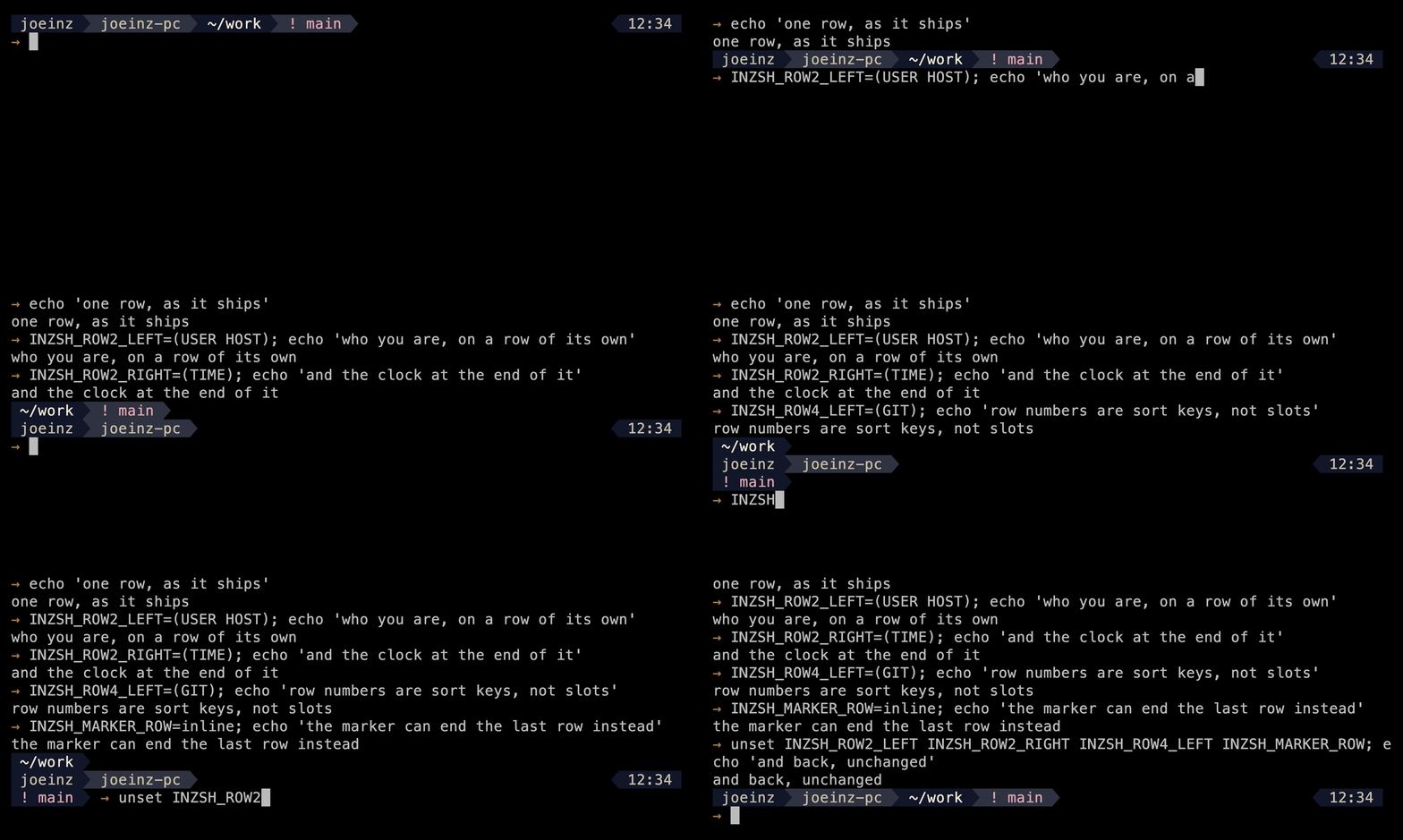
- Which row
INZSH_ROW<N>_LEFTandINZSH_ROW<N>_RIGHTtake an array of segment names in draw order,<N>being1to8. Naming a segment there places and shows it, overridingINZSH_<SEGMENT>_RANKentirely — a registered0included, which is the other way the four hidden segments appear._MINCOLSstill applies: a row array places a segment, it cannot resurrect one the terminal has no room for.- Sort keys, not slots
- Row numbers order the rows; they do not reserve them. Declare rows
1and4and you get two rows, drawn next to each other, because a row with nothing on either side is not drawn at all. So there is no gap to leave and no renumbering to do when you take one out. - Per side
- The override is per side of a row. Setting one row's left leaves its right to derive from rank as usual — and it leaves off everything else that would have landed on that left, rather than sliding it onto the right or onto another row.
- Arrays only
- A scalar assignment is refused rather than split on whitespace, so one string naming two segments behaves as if the variable were unset. These are the one family read outside the configuration registry, because every other validator on this page describes a single value rather than a list.
- Where you type
INZSH_MARKER_ROWsettles where the input marker sits.owngives it a bare line of its own below every drawn row, which is what the theme ships;inlineends the last drawn row with it instead, after that row's left-hand blocks, and you type on that row. Anything else falls back toown.- When one will not fit
- Fitting is per row: content that will not fit is dropped on its own row and never relocated to another one.
inzsh doctornames every segment, the row and side it landed on, and the reason where it did not — including a row-array entry that named no segment this build has, which is dropped before the prompt is ever drawn.
Prayer times · computed locally
Prayer times, in the prompt.
Your machine does the calculation, from coordinates you give it or, if you ask, ones it looks up once. The times are never fetched, and the segment stays hidden until you set it up.
Four values in .zshrc
INZSH_SALAH_LAT=21.4225INZSH_SALAH_LON=39.8262INZSH_SALAH_METHOD=mwlINZSH_SALAH_ASR=shafi# standard · shafi · hanafi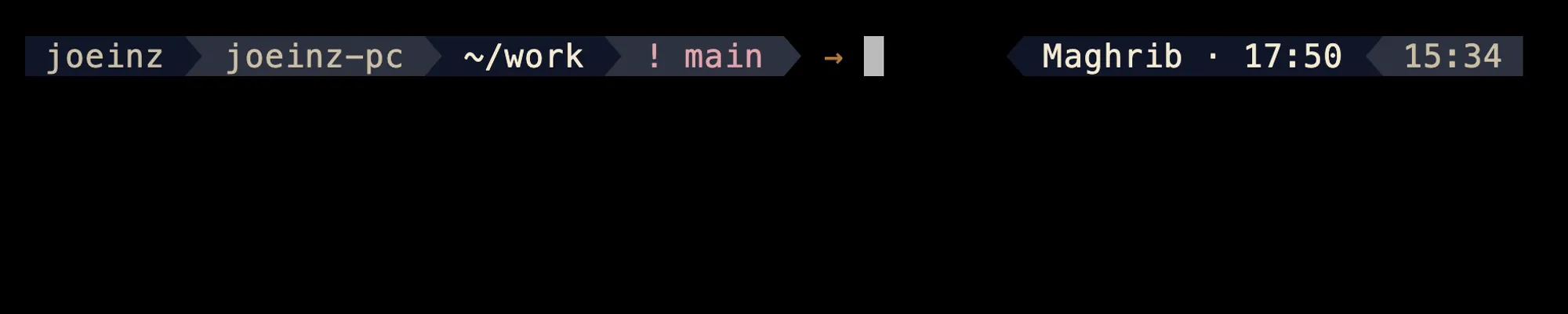
- Methods:
MWLMuslim World League ·ISNAIslamic Society of North America ·UmmAlQuraUmm al-Qura University, Makkah ·EgyptianEgyptian General Authority of Survey ·KarachiUniversity of Islamic Sciences, Karachi ·AlgeriaMinistry of Religious Affairs and Wakfs, Algeria; defaultMWL.- Aliases:
Makkah,Mecca,UmmAlQuraUniversity,EgyptandMuslimWorldLeagueall resolve; matching ignores case, spacing and punctuation.- Asr:
standard·shafi·hanafi; defaultstandard.- Two details
- Umm al-Qura sets isha at a fixed 90 minutes after maghrib rather than by an angle. And maghrib is sunset for every method shipped here, which is where a method-specific offset would go if one were ever added.
- Accuracy
- These are calculations, not announcements from your masjid, so a local timetable can differ by a few minutes. Six offset knobs exist for exactly that:
INZSH_SALAH_OFFSET_FAJRand its siblings nudge any prayer up to three hours either way. The nudge is display only, so moving maghrib doesn’t move an isha measured as an interval from it. - High latitudes
INZSH_SALAH_HIGHLATtakesangle·seventh·middle·none; defaultangle. It decides what happens at latitudes where the sun never reaches the depression angle and fajr or isha would otherwise not exist;noneleaves the prayer absent rather than inventing one.- Privacy
- There’s one way this touches the network, and you switch it on twice.
INZSH_SALAH_AUTOLOCATEpermits a lookup; the request happens only when you runinzsh locate. It’s one HTTPS GET to a URL you can read and change, so you can point it at your own service. Whoever answers sees your public IP, which is what they’re asked to turn into a position. Set coordinates by hand and none of it applies.
Configured, not forked.
Nothing here needs a fork. Every setting declares what it takes, segments can be overridden individually, and inzsh preset changes the look without restarting your shell. The reference documents about fifty; these are the engine knobs, the ones that change the prompt rather than one part of it:
| Knob | Values | Default | Effect |
|---|---|---|---|
| INZSH_PRESET | sharpwarm | unset | Which register is drawn. Unset leaves the built-in one, which is the dark register. Read once, when the theme is sourced, so set it in .zshrc above the line that sources the theme. |
| INZSH_SURFACE_MODE | alternaterampflathue | alternate | How segment backgrounds are assigned. |
| INZSH_SEPARATOR_STYLE | arrowrounddivider | arrow | The glyph between two segments. arrow and round need a Nerd Font; divider needs only box drawing. |
| INZSH_SEGMENT_PAD | 0–4 | 1 | Columns of air either side of every block. |
| INZSH_MARKER_ROW | owninline | own | Where the input marker sits. own gives it a bare line of its own below every drawn row; inline ends the last drawn row with it, after that row's left-hand blocks, and you type on that row. |
| INZSH_ROW<N>_LEFT | an array of segment names | unset | Which row a segment's left side draws on, in place of its rank. <N> is 1 to 8, and the numbers sort the rows rather than reserving them. Arrays only: a scalar is refused rather than split on whitespace. |
| INZSH_ROW<N>_RIGHT | the same shape | unset | The same, for a row's right side. The override is per side, so setting one leaves the other to derive from rank as usual. |
| INZSH_TRANSIENT | 10 | 1 | Collapses the prompt to its minimal form after a command is accepted, so scrollback reads as commands and output. |
| INZSH_DIR_COMPONENTS | non-negative integer | 0 | Caps how many trailing path components stay before truncation. 0 is the whole path. |
| INZSH_GIT_TIMEOUT | 1–60 | 2 | Seconds before the git call is killed. |
Every knob states what it accepts and where it lands if you get it wrong. A bad value falls back instead of breaking your prompt. A misspelled name has nothing to validate against, so inzsh doctor reaches for the nearest registered name instead — and a name a past release retired gets its replacement named outright, since there is no spec left to refuse the value and nothing about the old name resembles the new one.
Get started
Three steps in.
You’ll need zsh 5.8+ and a Nerd Font (the prompt draws powerline separators). The installer is reversible: --uninstall takes everything back out. If you would rather not keep a clone, every release attaches inzsh.zsh-theme — the whole library concatenated in dependency order — to be downloaded and sourced from .zshrc on its own. That is also the only shape in which inzsh doctor reports a version number, because the version is stamped into the bundle as it is built; installed from a source tree, the theme reports the literal word source.
-
Clone and install
git clone https://github.com/joeloudjinz/inzsh.git ~/.inzshcd ~/.inzsh && zsh install.zshIdempotent: safe to re-run. It backs up your .zshrc before touching it.
-
Pick a preset
INZSH_PRESET=warmGoes in .zshrc, above the line that sources the theme. It’s only read at load, so below won’t take.
-
Optional: prayer times
INZSH_SALAH_LAT=21.4225INZSH_SALAH_LON=39.8262INZSH_SALAH_METHOD=mwlINZSH_SALAH_ASR=shafi# standard · shafi · hanafiLatitude, longitude, calculation method, Asr school. Off unless these are set.
Commands · what you can type
One command, four verbs.
inzsh is the only name the theme puts in your namespace, and everything it offers to be typed is a subcommand of it. A value that names itself is positional — inzsh preset warm — and anything a reader would have to guess at takes a named flag instead, which is why the injected clock the pinned suites need is --now <epoch> and never a bare number.
- Diagnose
inzsh doctorprints one block: the version, how it was installed and from where, the environment, the resolved prompt shape, where every segment landed and why, and any setting being ignored.- Switch register
inzsh preset warmswitches a shell that is already running, from the next prompt on;inzsh presetalone says which is in force. It reads no file, so a clone and the bundle behave identically.- Refresh the position
inzsh locatelooks your coordinates up only when the stored ones are past the TTL, so it is safe to run at every login.--forceasks regardless. It is the only thing here that touches the network.- Read the timetable
inzsh salahprints the whole of today,inzsh salah --days 7today and the next six. The header names the method, the school and the zone shown — never your position, or anything derived from it.
Gallery
The same prompt, three ways.
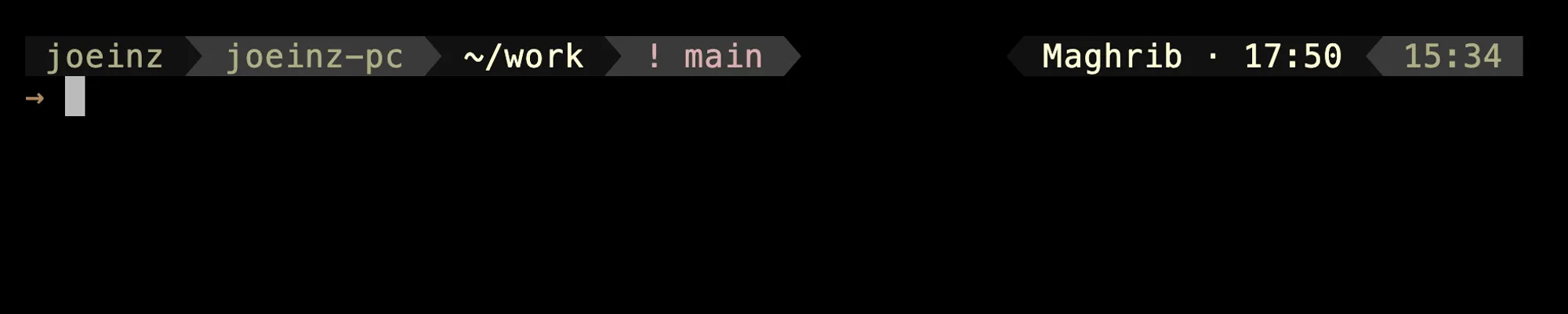
Two presets, one palette. sharp is dark, warm is light and a little warmer. The last shot is the same prompt on a terminal limited to 256 colours.
-
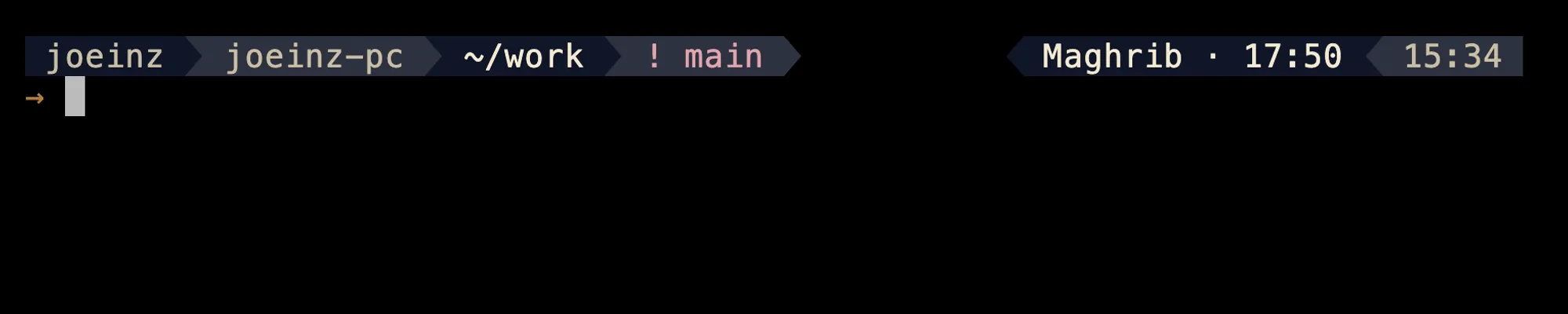
The sharp preset: dark, full colour. -
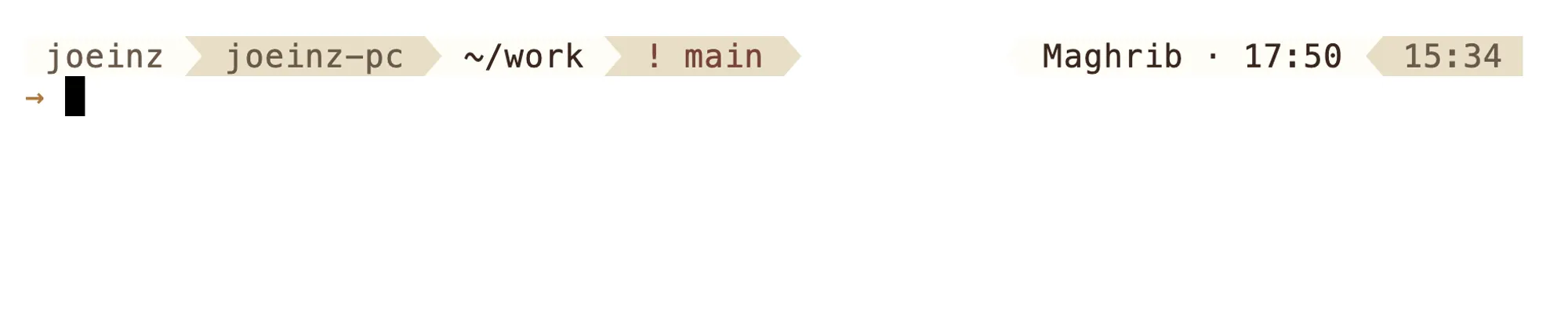
The warm preset: light, editorial. -
The 256-colour fallback, as macOS Terminal.app renders it.
- Requires
- zsh 5.8+ · a Nerd Font · a supported terminal
- Full colour
- Ghostty · iTerm2 · kitty · Alacritty · WezTerm (the design target)
- 256 colours
- macOS Terminal.app: palette tuned for it; close, not identical
- tmux
- Needs RGB passthrough:
set -sa terminal-features ',*:RGB' - Not supported
- Linux TTY and other bare consoles
- Optional
- oh-my-zsh
- License
- MIT
Colour · designed, and where it stops
It stays readable.
Contrast designed to AA.
Worked out pair by pair when the palette was built, with the ratios written down beside the colours in the token layer. That is design work on the record, not a gate: no test measures it.
Never colour alone.
No state is signalled by colour only; each one carries a glyph. This one the suite enforces, and it fails if a state loses its mark.
An honest fallback.
256-colour terminals get a hand-tuned palette that holds the theme’s shape. It’s close rather than identical, and says so.
Verification · 54 spec files
Built not to break.
- Fixtures
- Every still and recording here is rendered from the project’s VHS tapes in the pinned fixture environment (fixed repository, clock and identity), and nothing is hand-edited, cropped or resampled.
- Rebuilding
make shotsandmake demorebuild every file here from those tapes — in geometry and content rather than byte for byte: two renders agree on every glyph and differ only in where the cursor blink fell.SCALErenders them larger; these areSCALE=2.- Test suites
- 54 spec files, 27 unit and 27 render, plus 11 terminal-grid tests driving a real pty, an installer suite against a throwaway HOME and a perf suite: 3,231 examples and 91 UI tests. Golden files fail when the prompt changes shape.
- Render path
- No subprocesses: arithmetic and parameter expansion. Git status comes from a background worker and a cache, so a slow repository can’t stall it. Warm, it renders in 8.23 ms on CI against the 30 ms budget the build enforces — 27% of it, gated by 16 benchmarks.
- CI
- Runs on Linux and macOS, against zsh 5.8.
- Diagnostics
inzsh doctorreports what resolved, not what a knob asked for: the shape actually drawn, where each segment landed and why, the prayer cache’s health, and every setting being ignored. Never your coordinates, and the theme root with$HOMEcollapsed to~.
FAQ
Fair questions.
What leaves my machine?
Nothing, unless you opt in. There’s no telemetry and there are no network calls by default. The one exception is INZSH_SALAH_AUTOLOCATE=1, which permits an IP-geolocation query, and even then it only happens when you run inzsh locate yourself. Manual coordinates avoid it entirely.
How do I uninstall it?
The installer is reversible: --uninstall takes everything back out. Your .zshrc was backed up at install time.
Why do the colours look wrong in tmux?
tmux needs RGB passthrough: set -sa terminal-features ',*:RGB'.
Why does resizing VS Code leave copies of my prompt behind?
Some terminals re-wrap the rows already on screen when the pane changes width, and every one of those events leaves another copy of the prompt behind. That is xterm.js, which means VS Code and Hyper. Native terminals are unaffected: the case was fixed and verified on Ghostty, Terminal.app, kitty, iTerm2, Alacritty and WezTerm. Two ways round it in the meantime. INZSH_RESIZE_REFLOW=1 turns on arithmetic that should handle the re-wrap, though that path is unverified. INZSH_RESIZE=0 turns the redraw off altogether, which leaves one stale prompt until your next Enter rather than a column of them. Tracked as issue #215, and written up on the project’s limitations page.
What is inzsh doctor for?
Three questions now, where it started with two. What is running: the version, how it was installed and from where — with your home directory collapsed to ~, so the path is real and your account name is not. What the prompt actually resolved to: the shape it drew, the separator that really drew and a note when that is not the one you asked for, and a line per segment giving the row and side it landed on, or the reason it landed nowhere. And what is being ignored: every value the theme refused, with the vocabulary it should have used, a line each — ignored INZSH_SEPARATOR_STYLE=arrows - accepts arrow · round · divider — plus the nearest registered name for one it does not recognise, the replacement for one a past release retired, and any row-array entry that named no segment this build has. The prayer segment gets two rows of its own: where the position came from, and whether today’s table is cached. Nothing is printed when everything is valid, and your coordinates are never printed at all, so the block stays safe to paste into a public issue.
I’m on 1.x. What did 2.0 remove?
Two names, and neither of them quietly. INZSH_PROMPT_LINES was INZSH_MARKER_ROW’s deprecated alias through 1.x — 1 meant inline, 2 meant own — and 2.0.0 removed it rather than carry two names for one fact indefinitely. A .zshrc still setting it draws exactly as if that line were not there: never an error, never a wrong shape. And inzsh doctor names both the replacement and the value that means what yours meant, so a line left behind is a row in the block rather than a setting that quietly stopped counting. The other is the injected clock the pinned suites need, which was inzsh locate <epoch> and is now inzsh locate --now <epoch>: a positional argument is only allowed where the value names itself, and an epoch does not.
Give your prompt a system.
The installer is reversible, or read the source first.
MITno telemetryzsh 5.8+